Wordpress Create a Link to Existing Contents, Posts, Pages
WordPress is one of the popular blogging platform, offering lots of option depending on need.
On a blog or website its always useful to provide links to your other referenced article in the current post.
From WordPress 3.1, its now very easy to link to your existing contents, posts or pages.
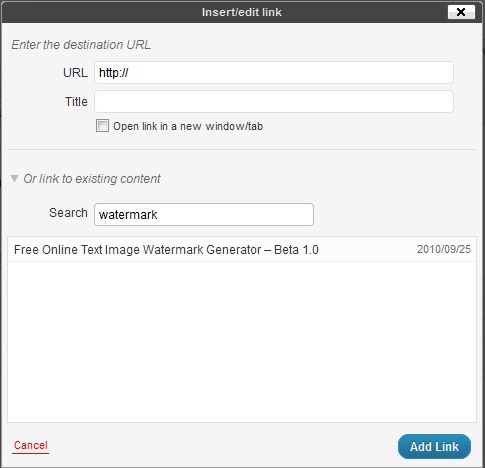
Whenever you want to link to your existing post, just select it and click on “Insert/Edit Link” or “Hyperlink” button.
By default all posts will be visible, but also provides you with an option to search. Just type what you want to search and add link.
Just check a sample link below 🙂
Free Online Text Image Watermark generator is a very simple and useful online tool for watermarking images.
GPT 5.4: The Next-Generation AI Model Transforming Reasoning, Coding, and Productivity Artificial Intelligence is evolving…
GPT-5.3 Instant is OpenAI's latest ChatGPT model update, prioritizing smoother conversations, fewer refusals, and higher…
Are you tired of scrolling endlessly through Google results trying to find clear, trustworthy answers?…
In recent years, the process of software development has rapidly evolved—developers demand smarter tools and…
India has emerged as one of the fastest-growing and most significant markets in the global…
On October 6, 2025, OpenAI unveiled AgentKit, a unified suite of tools designed to help developers and…
This website uses cookies.
View Comments
This may work for a text link, but you cannot link an image to existing content, like one of your pages or posts.