Wampserver Enable rewrite_module
Recently while working on one of the project I faced an issue. I had prepared a virutal machine for local dev environment. Moved live wordpress site localhost local environment. And my permalinks were not working when I moved live wordpress website from production server to local development machine. Clicking any permanent link results into 404 error.
Though its not a new issue or very major issue. It was just not in the list of steps to follow for different environment. So thought of sharing this with everyone.
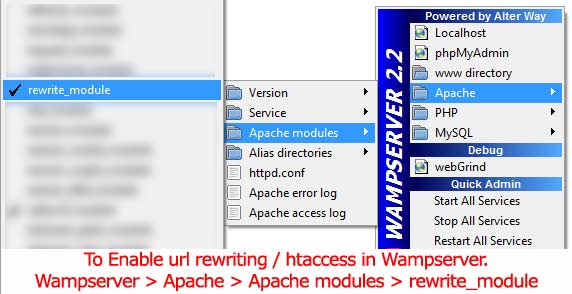
So to fix this you should enable rewrite_module of apache server from your wamp server. Basically it will change “httpd.conf” file and it will restart your apache server.
Pro Tip: Do you know you can Install Full LAMP Package with single command in Ubuntu Linux or even you can manually Install LAMP-SERVER, linux, apache, mysql, php in Ubuntu Linux version ?
To enable rewrite_module just follow these steps
When using WAMP SERVER if you faced an issue similar to me where you downloaded a backup of wordpress and restored it to your local machine. But after restoring your permanent links no more work. It shows 404 error. Then just try above steps see if it works properly.
GPT 5.4: The Next-Generation AI Model Transforming Reasoning, Coding, and Productivity Artificial Intelligence is evolving…
GPT-5.3 Instant is OpenAI's latest ChatGPT model update, prioritizing smoother conversations, fewer refusals, and higher…
Are you tired of scrolling endlessly through Google results trying to find clear, trustworthy answers?…
In recent years, the process of software development has rapidly evolved—developers demand smarter tools and…
India has emerged as one of the fastest-growing and most significant markets in the global…
On October 6, 2025, OpenAI unveiled AgentKit, a unified suite of tools designed to help developers and…
This website uses cookies.

View Comments
Great post, I'll keep updated on your future posts. Thanks for sharing.