How To Disable Always Display Images From In GMail
Gmail logo
Ever faced an issue where you clicked “Always display images from” in GMail and could not find it to undo. I ran into this problem and could not find it to undo it for that email id.
Gmail Always Display Images from this sender
Actually its possible to undo or disable “Always display images from” for a particular email id.
How To Undo/Disable Displaying External Images In GMail For a Single Email ID ?
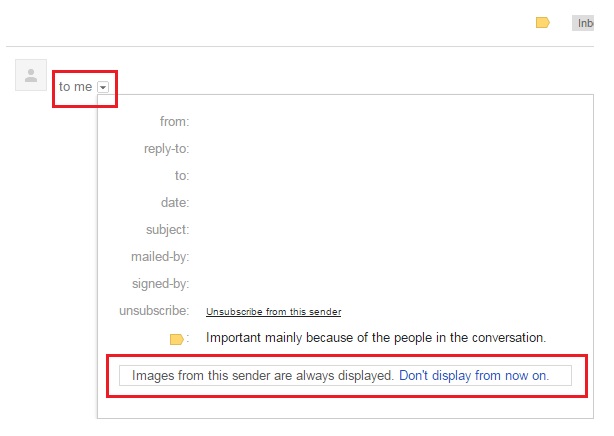
Open the email for which you want to disable loading external images.
Click on small arrow icon “Show details“.
How to Disable Always Display Images From Gmail
At the bottom of the box, you will see a message and a link to disable loading images.
Message is shown as “Images from this sender are always displayed. Don’t display from now on.“
Click on “Don’t display from now on.” and you are done.
Just try loading same email again and now external images will not be loaded.
Click on “Ask before displaying external images” radio button.
Then scroll down and click “Save Changes“.
If you find the solution useful then do share it with your friends.
ProWebGuru
Mostly I write about technology related stuff on https://www.prowebguru.com Recently I have started making videos also. Mostly blog posts & videos are related to technology, programming and learning some new tips and tricks related to windows, wordpress, google app script, technical, programming, javascript, jquery and other coding related stuff. Youtube channel - https://www.youtube.com/user/prowebguru