Google Docs Spreadsheet Freeze 1st Row, Fixed Row Header
For those who need their documents always online and accessible everywhere then “Google Docs” is the best solution for them.
And creating and using spreadsheets or excel files is very easy in Google Docs.
Sometimes we need a spreadsheet/excel sheet with fixed header row. How to freeze a row in excel ? This can be done easily in Google Docs Spreadsheet.
Login to Google Docs.
Open any spreadsheet/excel sheet.
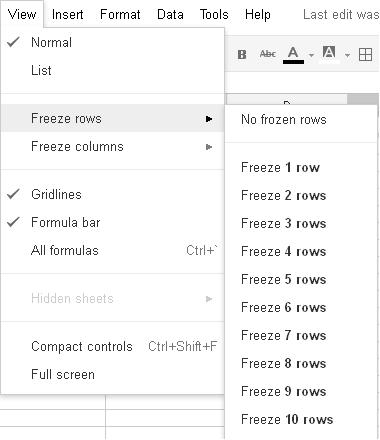
Go to View Menu. Here you can find freeze option in excel.
Then to Freeze Rows.
Then Select Freeze 1 Row.
Checkout following image for more details…
Hope your problem of how to make a fixed header in excel will be solved by above solution. Once you freeze header in excel, you can easily navigate rest of the sheet without losing track of headers. Its very easy to freeze panes in excel.
GPT 5.4: The Next-Generation AI Model Transforming Reasoning, Coding, and Productivity Artificial Intelligence is evolving…
GPT-5.3 Instant is OpenAI's latest ChatGPT model update, prioritizing smoother conversations, fewer refusals, and higher…
Are you tired of scrolling endlessly through Google results trying to find clear, trustworthy answers?…
In recent years, the process of software development has rapidly evolved—developers demand smarter tools and…
India has emerged as one of the fastest-growing and most significant markets in the global…
On October 6, 2025, OpenAI unveiled AgentKit, a unified suite of tools designed to help developers and…
This website uses cookies.
View Comments
Thank you!
Thanks....
Thanks a lot!!
This is not for "Google Docs" but rather "Google Spreadsheet"...